Project Story
A Shopify hat builder that shows a customer's logo as embroidery, 3D puff or DTF print before they buy
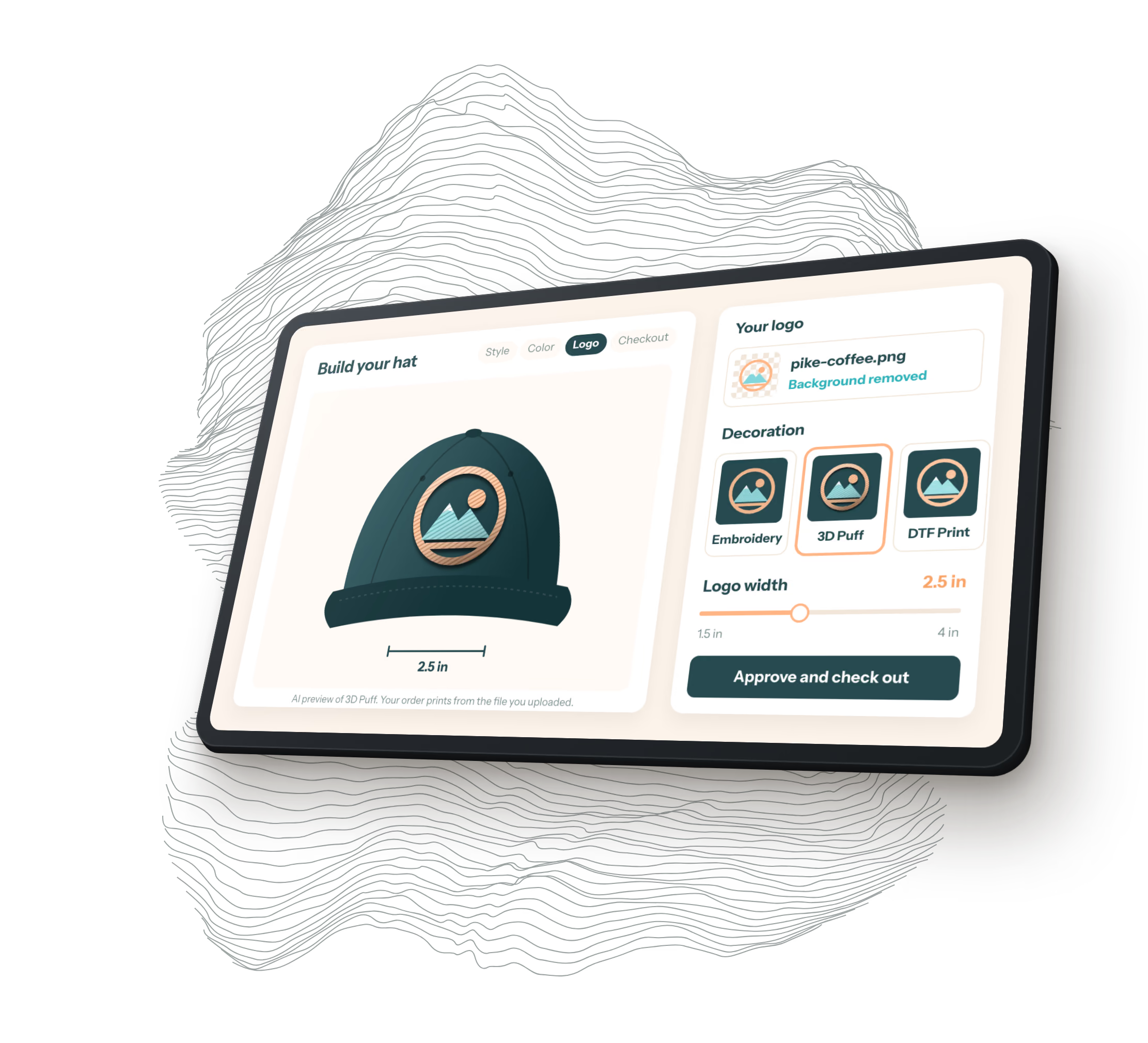
Billest sells custom hats with a 12-hat minimum, and its customers wanted to see their logo on the hat before ordering. We built a hat builder into Billest's Shopify store that cleans up an uploaded logo, renders it in embroidery, 3D puff and DTF print with OpenAI's image models, places it on the real hat photo at the size it'll be made, and checks out through Shopify Draft Orders.
- Client
- Billest
- Industry
- Custom apparel e-commerce
- When
- 2026
- Status
- Live on Billest's Shopify store since August 2026
- Next.js 15
- TypeScript
- Tailwind CSS
- OpenAI image API
- Shopify Theme App Extension
- Shopify App Proxy
- Shopify App Bridge
- Shopify Draft Orders
- Upstash Redis
- UploadThing
- sharp
- esbuild
- Vercel
- Sentry
- Datadog
A logo on a hat, before anyone pays for 24 of them
Billest makes custom hats. A customer picks a style and a color, uploads a logo, chooses how it’s applied (flat embroidery, 3D puff embroidery or DTF print, a film transfer pressed onto the fabric) and orders at least 12 of each style. That’s a lot of hats to commit to from a flat PNG. The builder’s first version ended in a quote request, and since May it checks out directly.
The builder sits on Billest’s own product pages. It shows the customer’s logo rendered in all three methods, on the photo of the exact hat and color they picked, at the width they asked for. Billest doesn’t need a SKU for every combination. Each hat is a draft order line on a real variant, carrying the original logo file and the mockup the customer approved.
It went live on the store the week of August 17, 2026. A few days later Billest told us it had 13 orders and hadn’t marketed the builder at all. We’ve merged 117 pull requests on it since April.
Cleaning up the logo first
Most uploads are a logo on a white or colored rectangle. The builder offers to remove that background with a flood fill seeded from the image border, a deliberate choice over a neural matting model. For a logo on a flat or smoothly shaded background, the fill is more faithful and gives the same pixels every time. Its color tolerance adapts to how noisy the border is, anywhere from 18 to 32. The fill follows small pixel-to-pixel steps so gradients and soft shadows clear too. If the border is textured, like a photo, the app flags the cutout as unreliable.
The cutout is only ever a preview. It’s returned inline and never stored. The order carries the customer’s original upload as the print file, and a Background Removed: Yes attribute tells production that the approved mockup and the print file differ. Billest approved it working that way, since their team does its own cleanup.
The same request measures how fine the artwork is. A distance transform over a 2,000 pixel mask gives every stroke’s width as a fraction of the logo’s width, which turns into inches at the largest size the hat takes. The builder reads the thinnest 15% of the line work against each method’s floor: 0.050 inches for 3D puff, 0.020 for flat embroidery, 0.004 for DTF print. Those floors came from four customer files Billest judged by hand. A design with 0.031 inch line work loses 3D puff and keeps embroidery.
At first this was a warning. Billest told us customers ignored it, so since September a method the artwork can’t hold is withdrawn, dimmed with the reason underneath. Print is never withdrawn for detail, since it holds anything. One style has a seam down the front panel and can’t take print at all, so fine artwork on that hat keeps its methods and gets the warning instead. Otherwise it couldn’t be ordered.
Three renders from one image model
Each logo becomes three image edits sent to OpenAI in parallel, one per method. A customer with no logo file can describe one instead, and a faster sibling model draws it. The decoration model has changed three times: gpt-image-1 in April, gpt-image-1.5 in July, and gpt-image-2.5-sunburst in late October, after OpenAI retired the first and scheduled the second for December 1.
The prompt starts by telling the model to inventory the source (its colors, which pixels are transparent, the exact silhouette) and treat it as a finished brand asset. Then come locks for alpha, color, shape and detail, then a texture paragraph for the method. Each lock is there because of a failure we saw. Puff, left alone, fills hollow outlines and buries thin light lines in a dark shape, so its paragraph says height grows up and never out.
The harder problem was that the model ignores transparency. It reads whatever color is stored under transparent pixels, so a logo with white there came back with its holes filled white, and one with black came back inverted. Now a logo on a transparent canvas is placed inside a 12% margin of a key color it doesn’t use (magenta, then green, then cyan), the prompt says that color means empty, and code clears it from the render afterward, unmixing edge pixels so they don’t stay tinted. The model also widens a wordmark by 8 to 17% when it has room, so the render is squeezed back to the source’s proportions. A logo with a background of its own goes the other way: rendered opaque, then cut back to the source’s silhouette, which also trims any hat the model drew in the margins.
On the actual hat, at the size it'll be made
The render is laid over the photo of the variant the customer picked. A slider sets the logo width from 1.5 to 4 inches in half-inch steps, starting at 2.5. A tall logo is held to 2.5 inches of height, the standard starting figure for a structured cap front, which we haven’t measured on these hats. The width is rounded down to a tenth of an inch once, so the preview and the draft order can’t quote different widths.
Turning inches into pixels needs to know how wide the hat’s front is, and this is the number we’re least sure of. It started at 7 inches, the crown’s width seen from the front. Billest said logos looked far too small, and on their reference photo a logo they call 3 inches covers 64% of the crown where we were rendering 40%. A value of 4.42 inches reproduces that photo exactly. Billest preferred 5.2 by eye in the live preview, and that’s what ships. That 5.2 and the span our calibration boxes cover disagree by about 1.35 times, so one of the two is wrong. A ruler across Billest’s printed reference would settle it.
At checkout the preview is redrawn onto a canvas for every hat in the order, using that hat’s own photo and the width fitted to its style. Each one is attached to its draft order line as an approved mockup. The attribute is labeled as a mockup so nobody in production mistakes it for the print file.
One app, three ways into Shopify
It’s one Next.js deployment on Vercel, and Shopify sees it three ways.
The theme app block is how the builder gets onto a product page. Billest adds a Hat Builder block in the theme editor without touching theme code, and it survives theme updates. It outputs an empty div and loads a script and stylesheet built with esbuild. Theme CSS kept breaking the builder’s layout, so the stylesheet is compiled with Tailwind’s base reset off and every rule scoped under the block’s root element.
The App Proxy is how that block talks back. Every call goes to a relative /apps/builder/api/... path on the store’s own domain, so there’s no cross-origin request. Shopify forwards it to Vercel and signs it. Our middleware drops the signature parameter, sorts the rest, joins them with no delimiter, computes an HMAC-SHA256 with the app secret and compares in constant time. A mismatch gets a 401, and /api/* called directly gets a 401 too, so the proxy is the only way in.
The proxy strips cookies in both directions, so state that needs to persist rides in the query string, which Shopify forwards and covers with the signature. It replaces any 5xx with its own HTML error page, so a handled AI failure answers 200 with a structured body the builder can read. It gives up at 60 seconds, and three image edits have to finish inside that.
The embedded admin is the third. Shopify loads it in an iframe inside the store admin, with App Bridge from Shopify’s CDN and a frame-ancestors policy set per shop. A request without a valid shop gets a 404. Staging and production are separate Shopify custom apps, each with its own credentials and Vercel environment.
A ceiling on the AI bill
The builder is public, so anyone can upload logos all day on Billest’s OpenAI account. Every visitor gets an anonymous device ID, and the limits live in one table in code. A device can make 3 AI logos an hour and 5 a day, and 12 decoration renders an hour and 30 a day. Every logo costs three renders. The whole shop gets 90 an hour and 300 a day, the only ceiling that holds when someone clears their browser storage and comes back as a new device.
Counters live in Upstash Redis because the proxy drops cookies. The windows slide so a day’s budget can’t be spent at 23:59 and again at 00:01. A render is checked before the call and charged only after it succeeds, so an OpenAI failure never costs a customer an attempt. If Redis is down, generation is allowed and an alert fires. Failing closed would take the builder down over a counter.
Failures are sorted by kind, because the customer sees different things. A rate limit is worth a retry. An exhausted OpenAI balance also arrives as a 429 and isn’t worth one. For a while the app read it as a rate limit, until we split the two. Either way the customer ends up looking at their own logo with reworded disclaimer text, so nobody is told they’re approving an AI rendering of a file that was never rendered.
The week the renders got worse
At the end of October Billest told us the mockups were getting worse and garbling most logos. They were right. The model change had broken both kinds of logo in different ways, and we fixed it over the next two days with the key color, the opaque path and the proportion fix above.
We also wrote pnpm check:decorations, which runs a set of test logos through all three methods and grades each render onto a contact sheet. It now holds 20 logo types, including one copied from the shape of a real customer logo that came back with magenta thread in its holes. On the final run, 21 logos in all three methods, the 63 renders came out 46 pass, 9 review and 8 fail. We read every one on the sheet. All 8 fails turned out to be the grader’s known false alarms, mostly on thick stitched letters. Logos with their own background went from 3 defects in 12 to none.
To be clear, the model varies between runs and each case was generated once, so that’s good confidence and nothing more. The app has no automated test suite yet either, and QA is manual through a local build.
Questions about this project
HQ, a software design and development agency in Ogden, Utah, built a hat builder into Billest's Shopify store. Customers upload a logo, see it rendered as flat embroidery, 3D puff embroidery and DTF print on a photo of the exact hat and color they picked, set its width between 1.5 and 4 inches, and check out through Shopify Draft Orders with the original logo and the approved mockup attached to every hat. It went live in August 2026.
The builder sends the customer's logo to OpenAI's image edit API three times in parallel, once per decoration method, currently on gpt-image-2.5-sunburst. Because the model ignores transparency, HQ places a transparent logo inside a margin of a key color it doesn't use, such as magenta, tells the model that color means empty, and removes it from the render afterward. Logos with their own background are rendered opaque and trimmed back to the source silhouette. The result is laid over the hat photo at the chosen physical width.
When a logo is uploaded, the server measures its stroke widths with a distance transform and reads the thinnest 15% of the line work at the largest size the hat takes. It compares that to a floor for each method, 0.050 inches for 3D puff, 0.020 inches for flat embroidery and 0.004 inches for DTF print, calibrated against customer files Billest judged by hand. A method the artwork can't hold is withdrawn in the builder with the reason shown. DTF print is never withdrawn for detail.
HQ used three Shopify surfaces served by one Next.js app on Vercel. A Theme App Extension block places the builder on a product page without editing theme code. Every request from it goes through the Shopify App Proxy on the store's own domain, and middleware verifies Shopify's HMAC-SHA256 signature on each one and rejects direct calls. The merchant dashboard runs embedded in the Shopify admin with App Bridge and a per-shop frame-ancestors Content-Security-Policy.
In Billest's hat builder, HQ capped AI use per anonymous device per hour and per day, plus a shop-wide budget of 90 renders an hour and 300 a day, with counters in Upstash Redis because the Shopify App Proxy strips cookies. The windows slide so a budget can't be spent twice across midnight, a render is charged only after it succeeds, and an exhausted OpenAI balance is reported differently from a temporary rate limit. When a cap is reached, the customer still sees their own logo on the hat.
Let's build together
Whether you're looking to design, build, update, or refresh an existing app or website, we can help. Even if we're not a good fit, we will help point you to somebody who might be.
Contact us