Project Story
Rebuilding a gift-certificate order system that prints barcoded certificates by the tens of thousands
Perfect Feast sells holiday food gift certificates that employers hand out by the thousand, and every certificate needs its own serial number and a GS1 coupon barcode a grocery register can scan. We moved the business off MongoDB onto PostgreSQL and rebuilt certificate generation in pdf-lib and bwip-js to handle orders of 18,400 and 60,000.
- Client
- Perfect Feast
- Industry
- Corporate gifting
- When
- 2026
- Status
- In use for the 2026 holiday season
- Next.js
- TypeScript
- tRPC
- Prisma
- PostgreSQL
- pdf-lib
- bwip-js
- archiver
- Vercel
The old system kept everything in one database, pictures included
Perfect Feast’s back office ran on MongoDB, and the logo and design images for every certificate were stored inside the records as base64 text (an image spelled out as characters). Records through January 1, 2025 alone came to about 8 GB of it.
The new app is Next.js with tRPC on top of PostgreSQL through Prisma, deployed on Vercel. The migration script (src/scripts/migrate.ts) reads the MongoDB shell exports directly, unwrapping ObjectId(), ISODate() and NumberInt() before parsing, and maps the old documents onto a relational schema:
- An old customer becomes an Account, a Site and its Contacts, with billing and shipping addresses copied across when only one was set.
- Products and orders come across with their line items, and order contacts are rebuilt from the customer data.
- Certificates are streamed from the export one line at a time and written in multi-row inserts of 500, so the file never has to fit in memory.
Every migrated row carries a migrated:<oldId> tag, so the script can be rerun without making duplicates, and it can do a dry run that writes nothing. The data had its own habits (about 39% of old addresses spell the field Country with a capital C), and the script handles each one it found. Serials got the strictest treatment, because a certificate in someone’s hand has to match a record. A certificate with a missing serial, or one that isn’t a positive number, is skipped and logged as an error rather than written with a default of zero. A separate validation script checks the migrated certificate IDs afterward.
Every certificate carries its own barcode
A Perfect Feast certificate is redeemed at a grocery register, so the barcode on the back has to be a manufacturer coupon the register already understands. That’s a GS1 North American coupon, encoded as GS1 DataBar Expanded Stacked and carrying Application Identifier (8110). We render it with bwip-js, the JavaScript port of the BWIPP barcode library, and draw it into the PDF with pdf-lib.
Our first version drew the single-row DataBar. We caught it by comparing our output against a photo of a real coupon the client sent and switched the default to the stacked symbology. The barcode is now fit into its print box by aspect ratio instead of stretched to fill it. Tests read the embedded image’s real pixel size back out of a generated PDF and fail if it’s distorted.
Since June 2026 each certificate’s serial is built into its own barcode. Getting that right took two tries. We first appended the serial as AI (21), which GS1 only defines after a product identifier like a GTIN, and BWIPP rejected it for coupon-only codes. The fix follows the JICC and GS1 US coupon guideline instead. An (8110) payload is a run of fixed and variable-length fields with no delimiters, so ai8110-coupon.ts walks it field by field (company prefix, offer code, save value, purchase requirement, family code, then optional Data Fields 1 to 4) and inserts the serial as Data Field 5, zero-padded to at least 6 digits and at most 15, ahead of any Data Field 6 or 9. A payload that already has a serial throws an error before anything prints, and so does one with its fields out of order.
Two print problems came from the client looking at real output:
- The human-readable line above the bars (company prefix, a hyphen, the offer code) printed blurry, because BWIPP baked it into the barcode’s pixels. We derive that line ourselves now and draw it as vector PDF text.
- Some codes printed with a short, squashed last row. Stacked DataBar packs a set number of symbol characters per row, and no single setting fits codes of every length. The app tries several row widths per code (
bwipjs.rawgives the module matrix in about 0.4 ms, against about 7 ms for a full render) and picks the one that best fills the 1 5/8 by 7/8 inch box the client specified. The choice is cached by code length, which is the same for every certificate in a run.
The certificate export identifies each certificate by account number and serial plus a Luhn check digit, so a mistyped ID fails the check.
Getting 18,400 certificates out of one click
A barcode per certificate had a cost we didn’t see right away. The old system had printed 55,000 certificates in one go, because an order shared a single barcode image. We measured a serialized certificate at 5.2 ms to build against 0.73 ms for a shared one, about seven times the work. An order of 18,400 today is roughly what 130,000 would have been under the old design.
The first order big enough to show it was 18,400 certificates, in September. Built in one request, the file was cut off at the server’s five minute limit and arrived corrupt. Our first fix split the order into parts and downloaded each one separately. Tested in a real browser, it saved one file of four. Chrome blocks a page from starting several downloads at once and doesn’t tell the page, so the app reported success with three parts missing. For a print run that was worse than the original failure, which at least failed where someone could see it.
What shipped instead is one zip per click, streamed from /api/orders/print-zip with the archiver library:
- The route builds one PDF part, appends it to the zip and waits for archiver’s
entryevent before building the next.append()only queues, so without the wait a slow connection lets every part pile up in memory. - The first part is built before any headers go out, so a certificate that can’t render comes back as a readable error instead of an empty archive.
- A failure after that destroys the response, and the browser marks the download failed. Nobody gets a truncated file that only turns out broken at the printer.
- A client disconnect is detected on the response’s
closeevent, checked againstwritableFinished. Our first version listened on the request, which on a GET can fire as soon as the empty body is read and would have aborted every download at the start. The tests caught that one before a browser did.
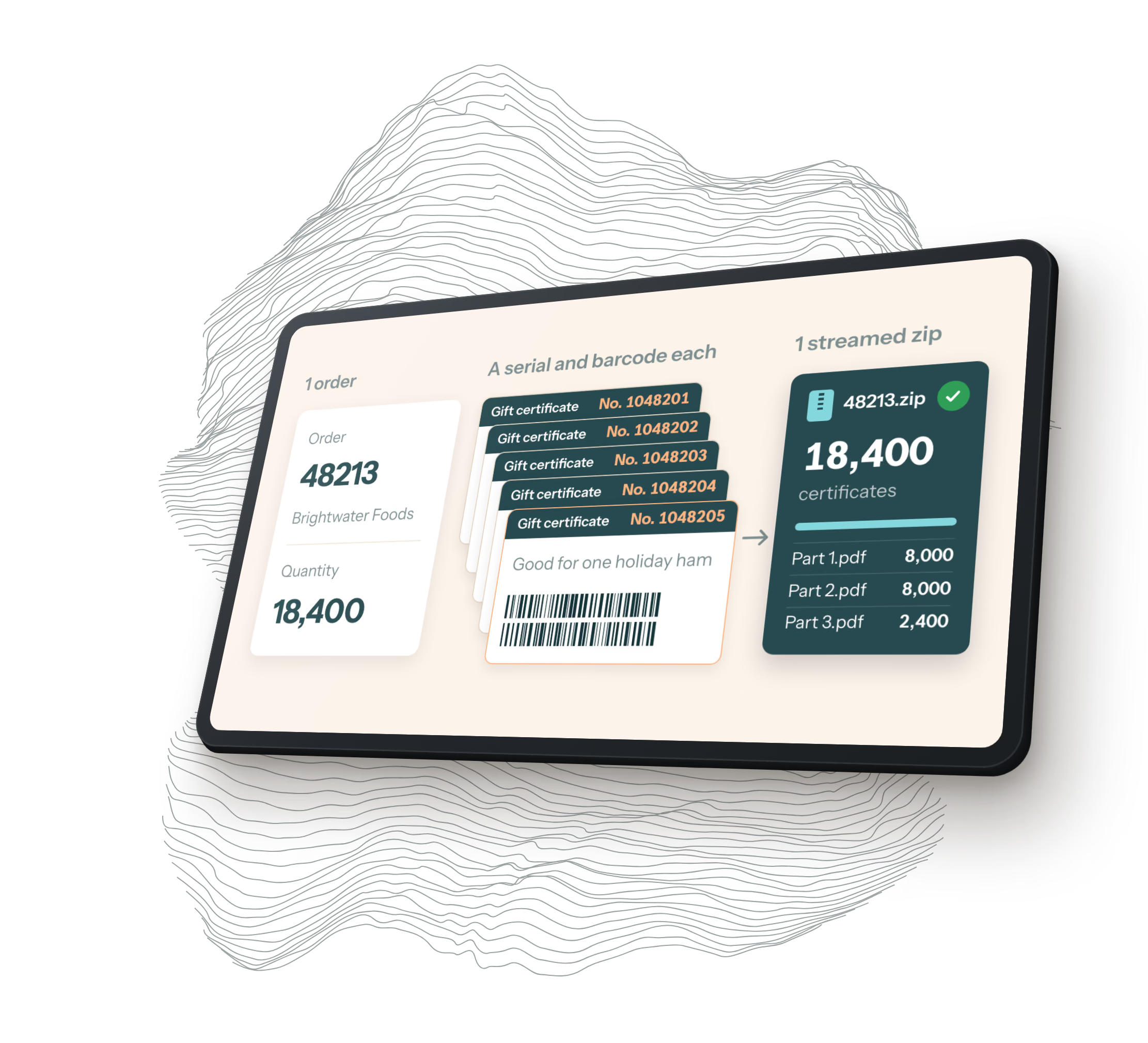
How the parts are cut is its own small planner (order-pdf-parts.ts). A part never spans two line items, so each certificate design is its own file. A line item splits at 8,000 certificates when each has its own barcode and at 40,000 when they share one, and zip batches are packed by build cost rather than file count, a shared certificate weighing about a seventh of a serialized one. We first sized those parts from how fast a certificate builds on our own machines and set the split at 10,000. The first big order after that timed out, because production runs about three times slower (16 to 20 ms per serialized certificate), so the split is now 8,000, the most production has proven it can build inside the function’s 300 second limit. An 18,400 order is three files. An order too big for one zip gets one button per batch, since a click can safely start exactly one download.
Line items also have a “serialize certs” box. Unticked, the line shares one barcode carrying its first certificate’s serial and builds at the cheaper rate. The client told us that’s fine for most of its customers.
The order that wasn't big
On October 8 an order wouldn’t generate, and Vercel reported the instance had run out of memory. We assumed the order was too big. Generation built every certificate row and sent one Prisma createMany, and we measured 40,000 rows in one statement pushing the process from 141 MB to 1.3 GB, almost all of it in Prisma’s native query engine rather than the JavaScript heap. So rows now go in batches of 1,000. A transaction-scoped Postgres advisory lock around serial allocation keeps each order’s serials one contiguous run across those batches, so another order generating at the same moment can’t interleave them.
Large orders needed that anyway, but it wasn’t what broke this one. Four days later a different order, 11,744 certificates, wouldn’t print even with the function’s memory raised to 4 GB. The first order had only 1,500.
Both carried a customer logo, and generation had copied the logo’s base64 string onto every certificate row. The 11,744 order held 11,744 identical 179 KB images (about 2 GB) and loaded all of them to draw one picture. Across the whole certificate table, logo copies were 5.1 GB of 5.9 GB. The logo now lives once on the line item. Certificates are loaded with an explicit column list that leaves the logo out, and every print path, reprints included, attaches the line item’s logo once and embeds it in the PDF once. Measured on that order’s data afterward, the print took 12.6 seconds and peaked at 555 MB.
Logos stored once, by what's in them
The same logo problem showed up a third way on October 16. An order with 14 line items, each with its own logo, wouldn’t save, because the form sent all 14 images as base64 inside one tRPC request and the route stops at 4 MB (Vercel’s own limit is 4.5 MB).
Images now upload one per request to an Image table in Postgres, keyed by the SHA-256 hash of their bytes. The form and the database only carry a short URL, /api/images/{hash}, so the same logo uploaded twice is stored once, and the URL can be cached forever because it names the content. The upload checks that a PNG or JPEG actually starts with that format’s file signature, not just that it claims to. On a production build the 14-logo order’s create request went from about 8 MB to 10 KB, and its zip held 14 PDFs, each with the right logo. Older rows with inline images still work, and a separate script moves them into the table.
How it's tested
The test suite is Vitest, with Playwright for the browser, and CI runs typecheck, lint and every test on each pull request. By mid October it was 1,409 tests in 131 files. The tests for the zip route read the archive back entry by entry with a small zip reader of our own, because a 200 response says nothing about whether every part made it into the file. They include a 45,000-certificate fixture and a mid-stream disconnect, and we checked them by breaking the code three ways on purpose (dropping the abort wake-up, putting the download loop back, miscounting a ragged batch) to make sure each one fails the suite.
We still printed. The barcode and download changes each went through a real order in a real browser, down to unzipping the download and opening the PDF.
Questions about this project
HQ, a software design and development agency in Ogden, Utah, rebuilt Perfect Feast's gift-certificate order system so it generates serialized certificates with a unique GS1 DataBar coupon barcode on each one. HQ moved the business off a legacy MongoDB system onto PostgreSQL and made the app handle orders of 18,400 and 60,000 certificates, delivered as one streamed zip download.
HQ prints a GS1 DataBar Expanded Stacked barcode carrying a GS1 North American coupon code, Application Identifier (8110), on the back of each Perfect Feast certificate. Each certificate's serial number is inserted into its own barcode as the coupon format's Data Field 5, and HQ checked the output against a photo of a real coupon before making the stacked format the default.
HQ's app inserts the serial as Data Field 5 inside the (8110) payload, as the JICC and GS1 US North American coupon guideline defines it, because AI (21) is only valid after a product identifier such as a GTIN. The (8110) payload has no delimiters, so the app walks its required fields and any optional Data Fields 1 to 4 to find the insertion point, pads the serial to at least 6 digits, and refuses payloads that already contain a serial or have fields out of order.
HQ's app builds a large order in PDF parts and streams them into a single zip with the archiver library, building the next part only after the previous one has been written, so server memory stays at about one part. Each PDF holds up to 8,000 certificates with their own barcodes or 40,000 sharing one, so an 18,400-certificate order arrives as one zip of three files, and a failed build is marked as a failed download in the browser.
HQ wrote a rerunnable migration script that reads MongoDB shell exports and maps customers, contacts, products, orders and certificate serial numbers onto a PostgreSQL schema through Prisma, tagging each row with its old ID so a second run makes no duplicates. Certificates are streamed from the export and inserted 500 at a time, and any certificate with an invalid serial is logged instead of copied. Images the old system kept as base64 inside its records, about 8 GB through January 2025, are now stored once each in Postgres, keyed by a SHA-256 hash of their contents.
Let's build together
Whether you're looking to design, build, update, or refresh an existing app or website, we can help. Even if we're not a good fit, we will help point you to somebody who might be.
Contact us